
Let AI do the busywork, so you can do the coaching.
AI golf coaching built into Skillest. Automatic lesson summaries and full video transcripts. The ShadowPro AI practice partner. An AI profile and product builder that gets you live in minutes. And AI-suggested chat replies. Real features, in the software you already run on.
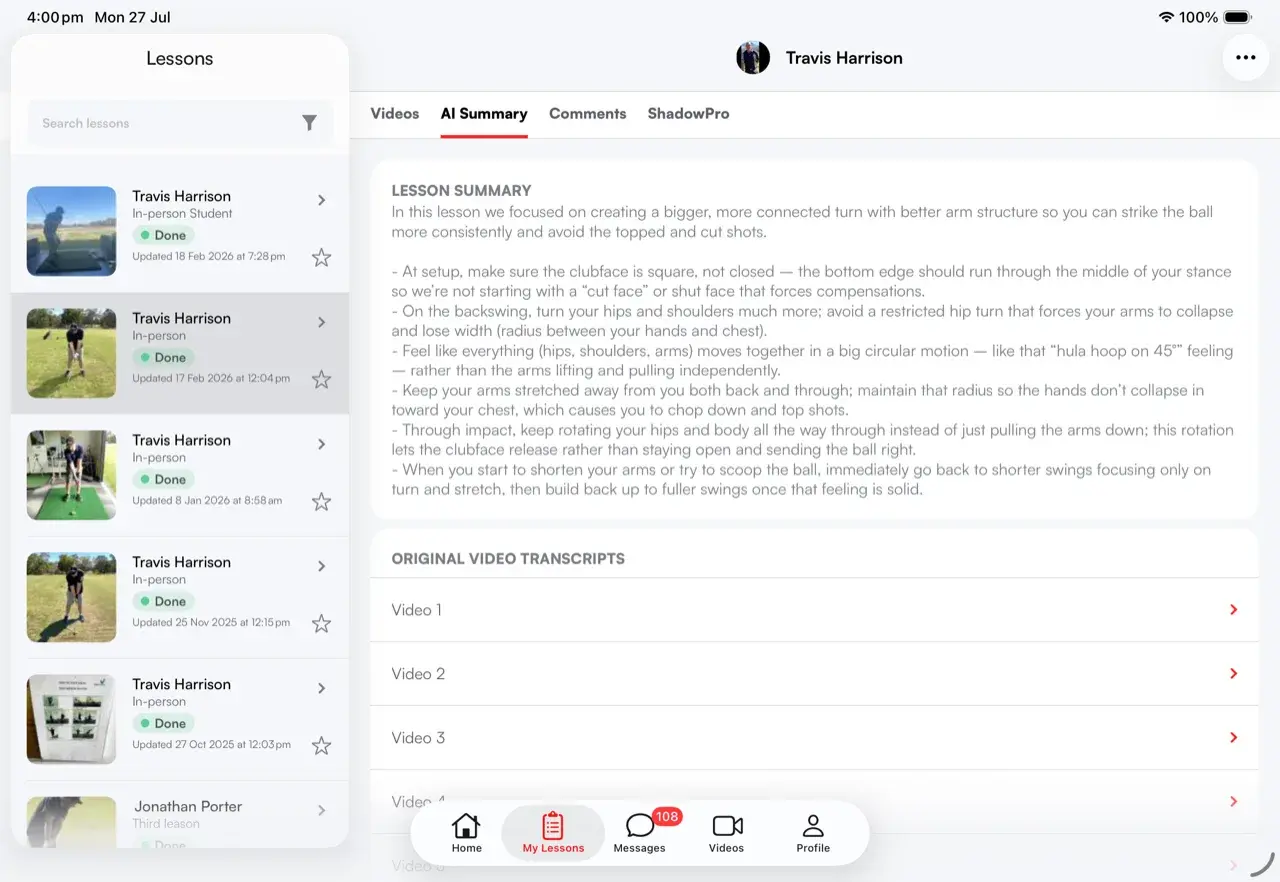
An AI lesson summary and full transcript, generated for you.
Generate a summary and a full transcript of any recorded lesson. The work that used to mean re-watching your own video and typing up notes happens in the background instead.
- Summary and transcript in one request.Tap to generate, and Skillest produces both from the lesson video.
- Track it as it generates.Watch the request step through requested, in progress and available, then it loads straight into the lesson.
- A readable record.The transcript becomes text you can scan and read, not just video you have to scrub.
- Tied to the lesson it came from.The summary lives on the lesson, alongside the swing analysis and the student plan.
- Less admin, more coaching.Cut the time you spend writing things up after every session.
Turn a finished lesson into a live practice session.
ShadowPro is a realtime, voice-led practice session your students run on their own. It's seeded from that lesson's AI summary and full transcript, so it can't start until the summary is ready.
- A live, spoken conversation.Students talk and ShadowPro talks back, in the moment, not a script to read.
- Seeded from the lesson.ShadowPro draws on the lesson's AI summary and full transcript, not a blank prompt.
- Waits on the summary.A session can't open until that lesson's AI summary has finished generating.
- Ends with its own summary.Every session closes with a write-up, so what was covered doesn't just evaporate.
- Rated right after.Students leave a rating when the session ends, a read on what's landing.
- A demo mode for coaches.Try a session yourself before you send students in; demo sessions aren't saved.
Your profile and first products, drafted by AI.
One onboarding sheet drafts your public profile and your first products together. The profile builder writes your headline, credentials and teaching philosophy, while the product builder researches pricing and proposes packages and plans tailored to your sport and rate.
- AI profile builder.Headline, credentials, highlights and teaching philosophy, drafted from your social link and context.
- Tailored product suggestions.Built from your sport, your rate and how you coach.
- Pricing researched for you.Skillest proposes prices so you are not pulling numbers out of thin air.
- Published as drafts.Everything arrives as a draft, so you review and adjust before it goes live.
- Live in minutes.Removes the blank-page problem so a new coach can be up and running fast.
AI-suggested replies, right above the message box.
Contextual reply chips sit above the composer so you can answer a student in a tap. Keep them on everywhere, or turn them off for a single conversation.
- Contextual reply chips.Suggestions based on the conversation, shown above the message box.
- Tap to send or edit.Use a suggestion as-is, or tweak it before it goes out.
- One setting for every chat.Turn AI-suggested replies on or off as your default, across every conversation.
- Per-conversation control.Switch them off for one student without changing the rest.
- Faster between-session coaching.Most coaching happens in the inbox, so shaving seconds adds up.
Skillest is a total game-changer. I can deliver detailed, high-level coaching and stay closely connected with my students no matter where they are in the world. It's revolutionized how I coach.
 Alex Riggs · Skillest coach
Real AI coaching tools, not a chatbot bolted on.
Summary + transcript
Backend-generated summary and a full readable transcript for every recorded lesson.
Live generation state
Watch a request move from requested to in-progress to available, then load it into the lesson.
Realtime AI partner
A spoken practice session your students talk to, with an AI session summary and a post-session rating.
Generate with AI
Headline, credentials, highlights and teaching philosophy drafted from your social link and context.
Suggested packages
Researched pricing and proposed packages and plans you publish as drafts.
Suggested reply chips
Contextual reply chips above the composer, toggleable globally and per conversation.
AI that knows your lessons, students and products.
| Skillest | Standalone AI app | Manual workflow | |
|---|---|---|---|
| AI lesson summary & transcript | ✓ | Partial | − |
| Realtime AI practice partner | ✓ | Partial | − |
| AI profile builder | ✓ | − | − |
| AI product & pricing suggestions | ✓ | − | − |
| AI replies in your inbox | ✓ | − | − |
| Tied to the student's plan | ✓ | − | − |
Frequently Asked Questions
AI coaching tools, answered.
How do AI lesson summaries work?+−
What is ShadowPro?+−
Can I trial ShadowPro as a coach?+−
What does the AI profile and product builder do?+−
Can I turn off AI-suggested chat replies?+−
Let AI do the busywork. Built into the software you coach on.
Earn more, save time, and deliver world-class coaching, on your terms.
7-day free trial for new coaches